
January 11, 2026
In Spring ‘26 Salesforce introduced a new Apex class - ConnectApi.RecordUi with just one method - getPicklistValuesByRecordType(objectApiName, recordTypeId) .
If you're asking Why?...

Just joking. You are just too young to know that Salesforce didn't have it. The Idea -
Getting Picklist values based on Record Type
- has been sitting in IdeaExchange since 2012 (! 14 ! years).
Finally you can get structured information about Picklists using Apex code. Bellow you can find a few examples.
The code
String objectApiName = 'CustomObject__c';
String recordTypeApiName = 'RecordTypeA';
Id recordTypeId = Schema.getGlobalDescribe().get(objectApiName).getDescribe().getRecordTypeInfosByName().get(recordTypeApiName).getRecordTypeId();

ConnectApi.PicklistValuesCollection pvc = ConnectApi.RecordUi.getPicklistValuesByRecordType(
    objectApiName,
    recordTypeId
);

System.debug(JSON.serializePretty(pvc));
will result in
{
  "eTag" : null,
  "picklistFieldValues" : {
    "PicklistC__c" : {
      "controllerValues" : {
        "B2" : 1,
        "B3" : 2,
        "B4" : 3,
        "B1" : 0
      },
      "defaultValue" : null,
      "eTag" : null,
      "url" : "/services/data/v66.0/ui-api/object-info/CustomObject__c/picklist-values/012VF000001azSbYAI/PicklistC__c",
      "values" : [ {
        "attributes" : null,
        "label" : "C1-B1",
        "validFor" : [ 0 ],
        "value" : "C1-B1"
      }, {
        "attributes" : null,
        "label" : "C2-B1",
        "validFor" : [ 0 ],
        "value" : "C2-B1"
      }, {
        "attributes" : null,
        "label" : "C3-B1",
        "validFor" : [ 0 ],
        "value" : "C3-B1"
      }, {
        "attributes" : null,
        "label" : "C4-B2",
        "validFor" : [ 1 ],
        "value" : "C4-B2"
      }, {
        "attributes" : null,
        "label" : "C5-B2",
        "validFor" : [ 1 ],
        "value" : "C5-B2"
      } ]
    },
    "PicklistB__c" : {
      "controllerValues" : { },
      "defaultValue" : null,
      "eTag" : null,
      "url" : "/services/data/v66.0/ui-api/object-info/CustomObject__c/picklist-values/012VF000001azSbYAI/PicklistB__c",
      "values" : [ {
        "attributes" : null,
        "label" : "B1",
        "validFor" : [ ],
        "value" : "B1"
      }, {
        "attributes" : null,
        "label" : "B2",
        "validFor" : [ ],
        "value" : "B2"
      }, {
        "attributes" : null,
        "label" : "B3",
        "validFor" : [ ],
        "value" : "B3"
      }, {
        "attributes" : null,
        "label" : "B4",
        "validFor" : [ ],
        "value" : "B4"
      } ]
    },
    "PicklistA__c" : {
      "controllerValues" : { },
      "defaultValue" : null,
      "eTag" : null,
      "url" : "/services/data/v66.0/ui-api/object-info/CustomObject__c/picklist-values/012VF000001azSbYAI/PicklistA__c",
      "values" : [ {
        "attributes" : null,
        "label" : "1",
        "validFor" : [ ],
        "value" : "1"
      }, {
        "attributes" : null,
        "label" : "2",
        "validFor" : [ ],
        "value" : "2"
      }, {
        "attributes" : null,
        "label" : "3",
        "validFor" : [ ],
        "value" : "3"
      }, {
        "attributes" : null,
        "label" : "4",
        "validFor" : [ ],
        "value" : "4"
      } ]
    }
  }
}"controllerValues" : {
"B2" : 1,
"B3" : 2,
"B4" : 3,
"B1" : 0
},
"values" : [ {
  "attributes" : null,
  "label" : "C1-B1",
  "validFor" : [ 0 ],
  "value" : "C1-B1"
}, {
  "attributes" : null,
  "label" : "C2-B1",
  "validFor" : [ 0 ],
  "value" : "C2-B1"
}, {
  "attributes" : null,
  "label" : "C3-B1",
  "validFor" : [ 0 ],
  "value" : "C3-B1"
}, {
  "attributes" : null,
  "label" : "C4-B2",
  "validFor" : [ 1 ],
  "value" : "C4-B2"
}, {
  "attributes" : null,
  "label" : "C5-B2",
  "validFor" : [ 1 ],
  "value" : "C5-B2"
} ]

The code
String objectApiName = 'CustomObject__c';
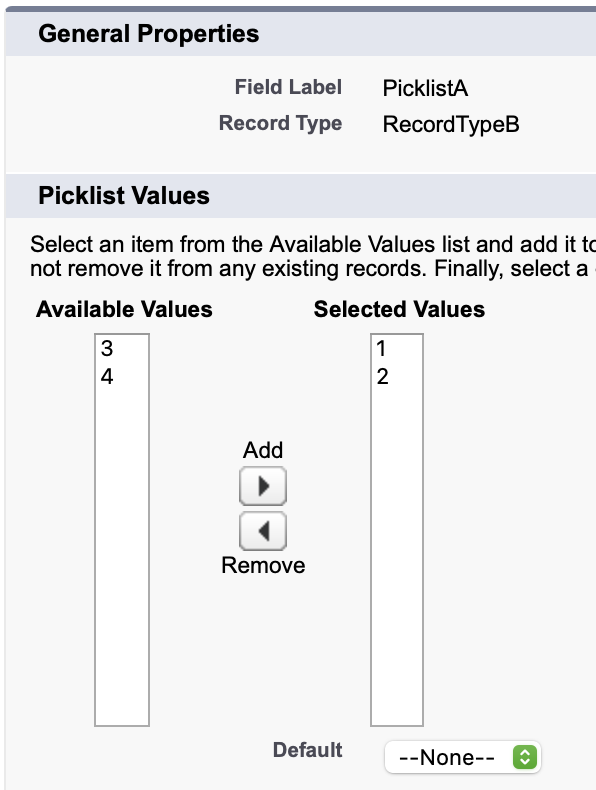
String recordTypeApiName = 'RecordTypeB';
Id recordTypeId = Schema.getGlobalDescribe().get(objectApiName).getDescribe().getRecordTypeInfosByName().get(recordTypeApiName).getRecordTypeId();

ConnectApi.PicklistValuesCollection pvc = ConnectApi.RecordUi.getPicklistValuesByRecordType(
    objectApiName,
    recordTypeId
);

System.debug(JSON.serializePretty(pvc));
will result in the same JSON except the part for PicklistA picklist field
"PicklistA__c" : {
  "controllerValues" : { },
  "defaultValue" : null,
  "eTag" : null,
  "url" : "/services/data/v66.0/ui-api/object-info/CustomObject__c/picklist-values/012VF000001azUDYAY/PicklistA__c",
  "values" : [ {
    "attributes" : null,
    "label" : "1",
    "validFor" : [ ],
    "value" : "1"
  }, {
    "attributes" : null,
    "label" : "2",
    "validFor" : [ ],
    "value" : "2"
  } ]
}
All objects technically have at least one Record Type called "Master". The code
String objectApiName = 'CustomObjectB__c';
String recordTypeApiName = 'Master';
Id recordTypeId = Schema.getGlobalDescribe().get(objectApiName).getDescribe().getRecordTypeInfosByName().get(recordTypeApiName).getRecordTypeId();

ConnectApi.PicklistValuesCollection pvc = ConnectApi.RecordUi.getPicklistValuesByRecordType(
    objectApiName,
    recordTypeId
);

System.debug(JSON.serializePretty(pvc));
will give you the same JSON as a result.
Check my next article - Get valid dependent picklist values for controlling picklist field. You will get a nice code that returns a list of available picklist values for a given CustomObject/RecordTypeId/PicklistField and CustomObject/RecordTypeId/PicklistField when another picklist field has specific picklist value selected.
Andrii Muzychuk, Certified Salesforce Application Architect can help you with enhancing your code.